
创建项目create-react-appantdReact安装:antd-mobile、react-virtualizednpmiantd-mobile-Snpmireact-virtualized-S在c
创建项目
create-react-app antdReact
安装:antd-mobile、react-virtualized
npm i antd-mobile -Snpm i react-virtualized -S在component 中创建一个scroll.jsx 文件,代码如下:
import \'./Scroll.less\';import { useEffect, useRef, useState } from \'react\';import { List, Image, InfiniteScroll, PullToRefresh } from \'antd-mobile\'; // 使用antd 的上拉加载与下拉刷新组件import { List as VirtualizedList, AutoSizer, WindowScroller } from \'react-virtualized\';const rem = Math.floor( ((document.documentElement.clientHeight > document.documentElement.clientWidth ? document.documentElement.clientWidth / 10 : (document.documentElement.clientHeight / 10) * 0.7) * 100) / 37.5 ) / 100; // 适配移动端,当前使用的 postcss-pxtorem 值为 37.5const Scroll = (props) => { const [rowHeight, setRowHeight] = useState(props.itemHeight * rem); // 每行的高度 const scrollElm = useRef(null); // 获取当前要滚动的元素 const [element, setElement] = useState(); // 赋值 WindowScroller 要滚动的元素 useEffect(() => { setElement(scrollElm.current); }, [scrollElm.current]); // 避免元素节点没有而滚动条有问题 return ( <div className="scroll-list" ref={scrollElm}> // 设置样式 <WindowScroller scrollElement={element}> {({ height, scrollTop, isScrolling }) => { return props.isPullUp ? ( <PullToRefresh onRefresh={props.onRefresh} headHeight={50} threshold={80}> <List> <AutoSizer disableHeight> {({ width }) => ( <VirtualizedList autoHeight rowCount={props.dataLength} rowRenderer={props.Row} width={width} height={height} rowHeight={rowHeight} overscanRowCount={5} isScrolling={isScrolling} scrollTop={scrollTop} ></VirtualizedList> )} </AutoSizer> </List> </PullToRefresh> ) : ( <List> <AutoSizer disableHeight> {({ width }) => ( <VirtualizedList autoHeight rowCount={props.dataLength} rowRenderer={props.Row} width={width} height={height} rowHeight={rowHeight} overscanRowCount={5} isScrolling={isScrolling} scrollTop={scrollTop} ></VirtualizedList> )} </AutoSizer> </List> ); }} </WindowScroller> {props.isPullTo && ( <InfiniteScroll loadMore={props.onLoadMore} hasMore={props.isLoading} /> )} </div> );};Scroll.defaultProps = { isLoading: false, isPullUp: true, itemHeight: 60, onRefresh: undefined, isPullTo: false, onLoadMore: () => {},};export default Scroll;
defaultProps: 为当前组件的默认的 Props
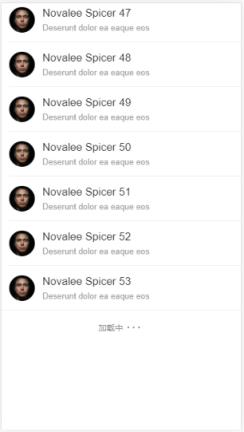
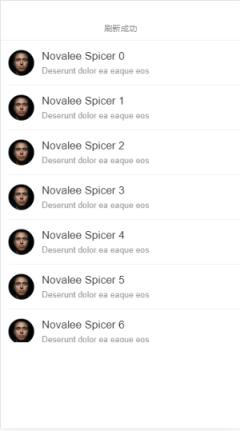
isPullUp:是否开启下拉刷新 itemHeight:为每行的高度 isPullTo: 是否开启上拉加载 WindowScroller 组件的参数说明可以查看:https://github.com/bvaughn/react-virtualized/blob/master/docs/WindowScroller.mdAutoSizer 组件的参数说明可以查看:https://github.com/bvaughn/react-virtualized/blob/master/docs/AutoSizer.mdVirtualizedList 组件的参数说明可以查看: https://github.com/bvaughn/react-virtualized/blob/master/docs/List.md 在App 中使用后,效果如下
适配移动端操作可以查看:react配置postcss-pxtorem适配
本站部分文章来自网络或用户投稿,如无特殊说明或标注,均为本站原创发布。涉及资源下载的,本站旨在共享仅供大家学习与参考,如您想商用请获取官网版权,如若本站内容侵犯了原著者的合法权益,可联系我们进行处理。